Reverse proxy
The API does not terminate TLS itself. It answers on 127.0.0.1:3000 of the
host only, and public HTTPS reaches it through one reverse proxy, in one of
three ways.
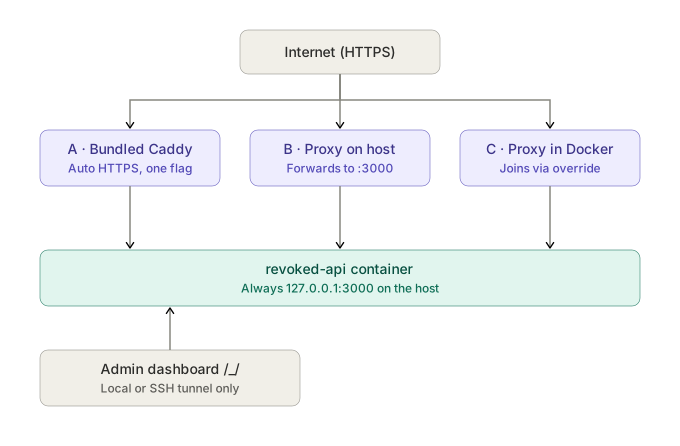
A · Bundled Caddy
For a host without a proxy of its own:
docker compose --profile caddy up -d
Caddy obtains and renews a Let's Encrypt certificate for DOMAIN on its own.
It needs DOMAIN to point at the machine and ports 80 and 443 to be reachable
from the internet; HTTP_PORT and HTTPS_PORT move them when something else
holds them. Certificates live in the caddy_data volume, so a restart does
not request new ones. The configuration is deploy/caddy/Caddyfile.
SITE_ADDRESS=localhost serves a local test instead, with a certificate from
Caddy's own authority, at https://localhost.
B · Proxy on the host
A proxy that runs directly on the machine — nginx, Caddy, Apache — forwards to
http://127.0.0.1:3000. For nginx:
location / {
    proxy_pass http://127.0.0.1:3000;
    proxy_http_version 1.1;
    proxy_set_header Host              $host;
    proxy_set_header X-Forwarded-For   $proxy_add_x_forwarded_for;
    proxy_set_header X-Forwarded-Proto $scheme;
    # The realtime channel is server-sent events, which buffering would hold.
    proxy_buffering off;
    proxy_read_timeout 1h;
    # At or above FILE_MAX_SIZE, so an oversized upload gets the API's error.
    client_max_body_size 2g;
    proxy_request_buffering off;
}
For Caddy, the whole site is reverse_proxy 127.0.0.1:3000.
C · Proxy in Docker
A proxy in its own container — Nginx Proxy Manager, Traefik — cannot reach the
host's 127.0.0.1. It reaches the API by name over a Docker network it is
already on, which a second compose file joins:
docker compose -f docker-compose.yml -f docker-compose.network.yml up -d
PROXY_NETWORK names that network, proxy-network unless set. The proxy then
forwards to http://revoked-api:3000 (CONTAINER_NAME:API_PORT). Plain HTTP
is fine there: the traffic never leaves the Docker network.
Nginx Proxy Manager: forward hostname revoked-api, forward port 3000,
scheme http, with Websockets support on for the realtime channel.
Client addresses
Rate limits key on the client's address, which the proxy passes in
X-Forwarded-For. The server trusts that header from its first start
(TRUSTED_PROXY_HEADER), reading the rightmost entry — the one the proxy
appended — so a client cannot claim another address. The bundled Caddy, nginx,
Traefik and Nginx Proxy Manager all set it.
One proxy sits in front, not two: each proxy in a row adds an entry, and
behind two every request seems to come from the outer one, so all per-IP
rate limits share one budget. A server reached with no
proxy at all sets TRUSTED_PROXY_HEADER=none, since any client could write
the header itself.
Dashboard
/_/ is the superuser dashboard. It and the superuser sign-in behind it answer
only requests that reach the container directly — from the machine itself, or
over an SSH tunnel — and return 404 to anything that came through a proxy.
From another computer:
ssh -L 3000:127.0.0.1:3000 admin@api.example.com
The dashboard is then at http://localhost:3000/_/. DASHBOARD_ACCESS=public
serves it through the proxy as well; an access list on the proxy then limits
/_/ to known addresses.
A request counts as direct when it carries no forwarding header and arrives
from a loopback or private address. A proxy that adds no X-Forwarded-For
would therefore look direct, which is one more reason the header is set.