Set up a server
The server is one Go binary with a built-in database. In production it runs in a container behind a reverse proxy that terminates TLS, with one DNS record that other servers check its identities against.
Requirements:
- A domain or subdomain that points at the machine, such as
api.example.com. It becomesDOMAIN, and it is chosen once: every identity the server issues is signed for it, and other servers check those identities against DNS records under it. - Docker with Compose.
A reverse proxy is optional up front: the stack brings one along.
How traffic reaches the server
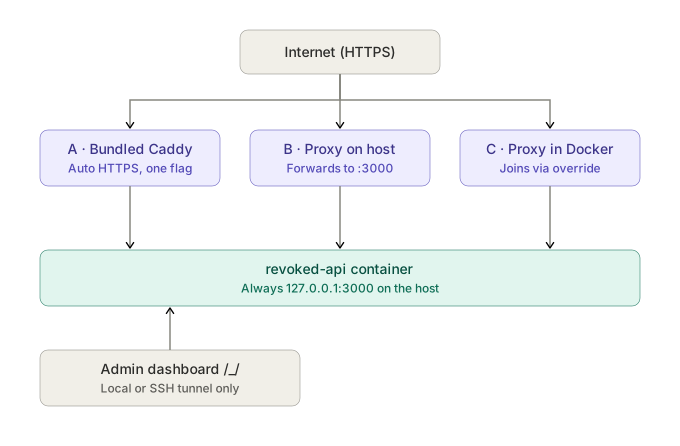
The container answers on 127.0.0.1:3000 of the host and on no other
address. Public HTTPS reaches it through one of three proxies, described in
Reverse proxy:
| Path | Fits a host that | Command |
|---|---|---|
| A · Bundled Caddy | runs no proxy yet | docker compose --profile caddy up -d |
| B · Proxy on the host | runs nginx, Caddy or Apache directly | docker compose up -d, the proxy forwarding to http://127.0.0.1:3000 |
| C · Proxy in Docker | runs Nginx Proxy Manager, Traefik or another proxy container | docker compose -f docker-compose.yml -f docker-compose.network.yml up -d |
The superuser dashboard at /_/ and its sign-in answer only requests that
reach the container directly, never through a proxy. It is opened over an SSH
tunnel (see Dashboard).
Install
git clone https://github.com/argseby/revoked && cd revoked
cp .env.example .env                  # DOMAIN is the one required value
docker compose --profile caddy up -d  # path A; B and C as in the table above
docker compose logs api               # prints the DNS record to publish
No Docker network has to exist beforehand, and nothing is configured in the
dashboard: the proxy header that rate limits read is set from
TRUSTED_PROXY_HEADER at every start.
For a server reached at https://api.example.com, the relevant .env values
are:
DOMAIN=api.example.com
ALLOW_SIGNUPS=false
DOMAIN is a hostname, without https:// or a path. With signups disabled,
accounts are added through the account setup rather than
through public registration.
Compose pulls the release image on every up, so nothing is built. A build of
this checkout goes through a second file, which tags the result
revoked:local rather than the release image's name:
docker compose -f docker-compose.yml -f docker-compose.build.yml up -d --build
Checks before going public
The API answers on the machine itself:
curl http://127.0.0.1:3000/healthz
curl -fsS http://127.0.0.1:3000/api/server | jq -r .version
Published images carry their release version. A build from source reads it
from the checkout's Git tags, or from REVOKED_VERSION when the copy has no
Git metadata; without either it reports dev. A server that reports dev
while the stack names the published image is running a local build left
under that name, which the next up replaces, since the image is pulled
every time.
From another computer, an SSH tunnel brings the same address there, for the app and for the dashboard alike:
ssh -L 3000:127.0.0.1:3000 admin@api.example.com
API_PUBLISH=3000 publishes the port on every interface instead. /healthz
and the version then answer by the machine's IP, but signing in does not: a
passkey cannot be bound to an IP address. A port open by IP also skips the
proxy's TLS, so it is set back before the server goes public.
Then, in this order:
- Publish the
_revokedTXT record the logs printed. It is what makes the server's identities checkable. - Reverse proxy, unless path A already serves HTTPS.
- Add people. Nobody can sign up on their own unless signups are allowed.
- Back up
pb_data. It holds the one file that can never be recreated.
Every setting is in the .env reference. Once the server runs, people get the app, or go straight to the desktop and Android downloads.
Verification and common failures
| Check | Expected result | If it fails |
|---|---|---|
curl --fail-with-body http://127.0.0.1:3000/healthz on the host |
ok |
docker compose logs api, the required DOMAIN, and the published port. |
curl --fail-with-body https://api.example.com/healthz from another machine |
ok over valid HTTPS |
Public DNS, TLS, ports 80 and 443 for path A, and the proxy's upstream. |
curl -s -o /dev/null -w '%{http_code}' https://api.example.com/_/ |
404 |
DASHBOARD_ACCESS is public, or the proxy sends no X-Forwarded-For. |
dig TXT _revoked.api.example.com +short |
The fingerprint printed by this server. | The exact TXT record name, and time for DNS propagation. |
App sign-in against https://api.example.com |
A passkey ceremony for that domain. | Account setup, and that the app uses the domain rather than a LAN IP address. |
A successful health check proves the process is reachable. It does not prove that account setup or the identity trust chain is complete.
Upgrade
Every release publishes a new image. The app's settings show Server update available once the server runs an older release than the newest one.
With REVOKED_IMAGE left at :latest, docker compose up -d pulls the
newest release, since the stack pulls its image on every up.
With a pinned release, the tag in REVOKED_IMAGE changes and
docker compose up -d pulls the new one on the way. pb_data carries over,
and migrations run when the server starts. A backup comes
first.
Portainer
A git-backed stack uses the compose path docker-compose.yml, with the
.env values in Portainer's Environment variables section.
- Path A: the variable
COMPOSE_PROFILES=caddystarts the bundled Caddy. - Path B: nothing beyond the compose path.
- Path C:
docker-compose.network.ymlgoes under Additional paths, andPROXY_NETWORKnames the proxy's network.
The stack runs the published image, ghcr.io/argseby/revoked, which carries
its release; Portainer builds nothing, and every redeploy pulls the image, so
:latest moves without Re-pull image. A release is pinned by setting
REVOKED_IMAGE to the full image reference, such as
ghcr.io/argseby/revoked:v0.36.0. A tag alone (latest, :v0.36.0) is not
an image name, and the pull fails with pull access denied. Left unset, the
stack runs :latest.